SUBSCRIBE TO GET FREE UPDATES
RSSRSSEmailEmail
       "Keep learning ~~ keep smiling ~~ keep sharing"     
Showing posts with label jump break. Show all posts

Sunday, January 9, 2011

Customize and style Read More link in Blogger

Thanks to a recent reader to this blog who wanted to know how to right-align 'Read More' in Blogger which prompted me to google for answers and learned much in the process.

Hence, I'm happy to share here some related tips for those seeking to learn how to customize and style the 'Read More' or Jump link in various ways as illustrated in the image below!

Read More or Jump Link samples

To do that, you'd first need to have the 'Read More' link below your post summaries in your blogspot posts. If you don't know how, follow this tutorial to create 'Read More' with Blogger's jump break feature.

Friday, January 29, 2010

Read More link missing from blogspot post summaries

Continuing from my related post on:
Create 'Read More' with Jump Break Feature in Blogger

Why is the 'Read More' link not appearing after the post summaries on the homepage or main page? Post has break and shows snippet but the text 'Read More' is missing? What went wrong, asked a blogger friend? I was as bewildered since my blogspot didn't encounter this problem and creating the Jump break feature was simply a breeze for me!

After doing some research online, I've learnt the following and the reasons why the Read More text link is missing below the post summaries :
  1. blogspot blogs using any of the original templates selected from Blogger's template library shouldn't encounter such a problem. Inserting the Jump Break function in a post will automatically display the post's summary and present the Read More link below it on blog's homepage.
  2. blogs using a customized third-party template will have to add a snippet of HTML code into their blog's template to make Jump Break feature work as mentioned at Blogger Help.
  3. even though your blog template is that of Blogger's, you may face the problem of the missing 'Read More' text, if it had been highly modified or customized as attested at Blogger Plugins and probably encountering some other problems as stated at Blogger Buster.
Thus, enlightened with the above knowledge and after some brainstorming and experimenting, I now know how to fix or solve the problem of the missing 'Read More' text link after the post summaries and would love to share a tutorial here.

Thursday, January 21, 2010

LinkWithin affects placement of Read More link!

The LinkWithin widget that is placed at the end of a blog post is such an asset! An easy widget to install, it will automatically generate thumbnails from your blog archive to link to related posts, to draw your visitors attention and keep them engaged.

The tutorial on how to install LinkWithin widget on your Blogger blog as shared in my previous post is perfect for normal standardized posts in full display, without the Read More text link
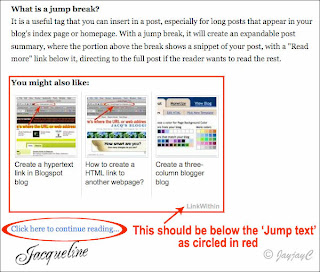
Screen shot showing the LinkWithin thumbnails above the Read More link as wrongly placedBut, if you're applying the 'Read More' feature for your posts in Blogger, then the LinkWithin widget will cause the Read More link that was created by the Jump Break to be shifted below it as seen in the left image. I find this inappropriate as the Read More link should be positioned just below the snippet instead.

Some bloggers even prefer that the LinkWithin thumbnails be shown under the post only after clicking the Read More link and not under the post summary in the home page. And, they have found a way to change that - learn at Blogger Buster on how-to remove them if you're in the same boat. I really don't mind as I find the thumbnails rather appealing, adding extra visibility and giving more options to readers!

My problem though, as indicated earlier was, the LinkWithin thumbnails should appear below the Jump Text and not above it. So, I decided to check from LinkWithin site itself and was delighted to have found a clue at LinkWithin FAQ page that included this Q&A below:
4. How can I customize the placement of the widget on my blog?
Modify your HTML template to add the code below at the place where you want the widget to appear:
<div class="linkwithin_div"></div>
Humph, that was all it showed...nothing more! What about how to apply that? Not helpful to a technically challenge person like me, huh!

Wednesday, January 13, 2010

Create Read More with Jump Break Feature in Blogger

Screen shot of Blogger's Insert jump break iconI didn't realized that inserting a jump break in my Blogspot posts is soooo very easy!

Hmmm...I have eyes but don't see! It appears that this wonderful feature, the 'jump break' icon at the extreme right of the New Post Editor's toolbar had emerged since last September and I had overlooked it for so long! Gosh!

This was one of Blogger's 10th birthday celebration gift to us! Happy Belated Birthday and a million thanks to the Blogger Team and all who have worked hard and smart to share this wondrous present!

I'm so excited to have stumbled upon this two nights ago and have just applied them at my blog posts! And, I would like very much to share here on how to insert the jump breaks for those who are also panting for such a feature.
(This post is specially dedicated to a dear friend, Cheah of No-Frills Recipes, an aspiring blogger)

What is a jump break?
It is a useful tag that you can insert in a post, especially for long posts that appear in your blog's index page or homepage. With a jump break, it will create an expandable post summary, where the portion above the break shows a snippet of your post, with a "Read more" link below it, directing to the full post if the reader wants to read the rest.
Custom Search